
Intel vs AMD: How to Choose the Right Dedicated Server in 2026
Intel or AMD? Learn how to choose the right dedicated server for game hosting, web hosting, business applications, and professional workloads by understanding what actually impacts server performance.
Choosing a dedicated server should be straightforward. You have an application to run, you pick a server that fits your requirements, and you deploy your project.
In reality, it rarely feels that simple.
Start comparing dedicated servers and you’ll quickly come across dozens of processor options: Intel Core i7, Intel Core i9, AMD Ryzen 5, Ryzen 7, Ryzen 9, multiple generations, different clock speeds, different core counts, and plenty of conflicting opinions.
Eventually, you’ll end up asking the same question that has dominated PC hardware discussions for years:
Should I choose Intel or AMD?
Search online and you’ll find hundreds of benchmarks, comparison charts and videos trying to answer exactly that question. Some claim Intel offers the best single-core performance. Others argue AMD provides better value thanks to higher core counts.
Both arguments can be true.
The problem is that neither one tells you which dedicated server is actually the right choice for your workload.
Synthetic benchmarks measure how a processor performs under a specific test. A production server is very different. It may host websites, run databases, process API requests, execute scheduled tasks, serve game traffic and handle hundreds of simultaneous connections — all at the same time.
That’s why choosing a dedicated server based solely on benchmark scores rarely produces the best result.
At Lusonode, when a customer asks whether they should choose Intel or AMD, we almost never start by talking about processors.
Instead, we ask a much simpler question.
What are you planning to run?
The answer to that question determines everything else.
Throughout this guide we’ll explain what actually affects dedicated server performance, why Intel versus AMD is no longer a simple debate, and how to choose the right platform based on your workload rather than marketing claims.
By the end of this article, you’ll probably stop asking “Which brand is better?” and start asking a far more useful question:
Which server best matches my workload?
The quick answer
If you’re looking for the short version, here it is.
There is no universally “better” processor between Intel and AMD.
Modern CPUs from both manufacturers deliver excellent performance.
The right choice depends almost entirely on the software you’re planning to run.
As a general rule:
- Workloads that rely heavily on one or a few threads benefit from strong per-core performance.
- Workloads that can spread tasks across many cores benefit from higher overall parallel processing capacity.
- In many cases, CPU choice isn’t even the biggest performance factor. Memory capacity, NVMe storage and application design often have a greater impact on real-world performance.
The rest of this article explains why.
The biggest mistake people make when choosing a dedicated server
One of the most common mistakes is choosing server hardware the same way people buy a desktop computer.
They compare clock speeds.
They compare core counts.
They look at benchmark rankings.
Then they buy whichever processor appears to have the biggest numbers.
Unfortunately, servers don’t work that way.
Real-world server performance is always the result of both hardware and software working together.
A powerful CPU may spend much of its time waiting for database queries.
A poorly optimized application may use only a single thread, leaving the rest of the processor almost idle.
Likewise, an expensive processor cannot compensate for insufficient memory or slow storage.
This is why two companies running the exact same processor can experience completely different levels of performance.
Before comparing Intel and AMD, it’s worth understanding what actually determines how fast a server feels in production.
What actually affects dedicated server performance?
When people compare processors, they often focus on clock speed or core count.
While both matter, they’re only part of the picture.
Several different components contribute to overall server performance.
Understanding them makes choosing the right server much easier.
Clock speed
Clock speed, measured in GHz, represents how many cycles a processor performs every second.
Higher clock speeds are particularly valuable for workloads that depend heavily on one or a small number of CPU cores.
However, clock speed alone does not determine performance.
Two processors running at exactly the same frequency can deliver very different results depending on their architecture.
This brings us to another important concept.
IPC
IPC stands for Instructions Per Clock.
Simply put, it describes how much work a processor can complete during each clock cycle.
A processor with higher IPC can outperform another processor running at the same frequency because it accomplishes more work every cycle.
This is one of the main reasons newer processor generations often provide significant performance improvements without dramatically increasing clock speed.
When comparing modern CPUs, IPC is every bit as important as frequency.
Core count
More cores do not automatically mean better performance.
Whether additional cores help depends entirely on the workload.
Some applications distribute work efficiently across many threads.
Others remain heavily dependent on one primary execution thread.
If software only uses one or two cores effectively, doubling the total number of cores won’t double performance.
On the other hand, highly parallel workloads can benefit enormously from additional processing resources.
Understanding how your application scales is far more important than simply comparing specifications.
Cache
CPU cache is another frequently overlooked component.
It acts as extremely fast memory located directly on the processor.
Frequently accessed data can be stored inside cache, reducing the need to fetch information from system memory.
Although cache size isn’t equally important for every workload, it’s one of the reasons processors with similar clock speeds may perform differently under real-world conditions.
Memory
Even the fastest processor cannot compensate for insufficient RAM.
Once a server runs out of available memory, the operating system begins moving data to storage.
Even fast NVMe drives are dramatically slower than physical memory.
Choosing the correct amount of RAM is therefore just as important as selecting the right processor.
Storage
Storage performance also plays a major role.
Databases, websites, game servers and business applications constantly read and write data.
Lower storage latency translates directly into faster response times.
That’s why every Lusonode dedicated server uses NVMe storage, providing significantly faster access times than traditional SATA SSDs.
Why benchmarks don’t tell the whole story
Every new processor launch brings dozens of benchmark comparisons.
They’re useful.
But they shouldn’t be treated as the final answer.
Benchmarks measure very specific workloads.
Some focus on compression.
Others measure rendering performance.
Some test gaming.
Others evaluate scientific calculations.
All of these tests provide valuable information.
The problem begins when people assume those numbers automatically represent every server workload.
A production server rarely performs only one task.
It may process web requests while serving database queries.
It may run scheduled jobs while handling API traffic.
It may host multiple independent services simultaneously.
Real-world workloads are much more diverse than synthetic benchmark tests.
That’s why benchmarks should always be viewed as one piece of the puzzle—not the entire picture.
Understanding your workload will almost always lead to a better hardware decision than simply buying whichever processor scored highest in a benchmark.
Choose your workload—not your CPU brand
Most Intel vs AMD comparisons start with the wrong question.
They ask which processor is faster.
The better question is:
What kind of work will your server actually be doing?
That’s what determines which platform makes the most sense.
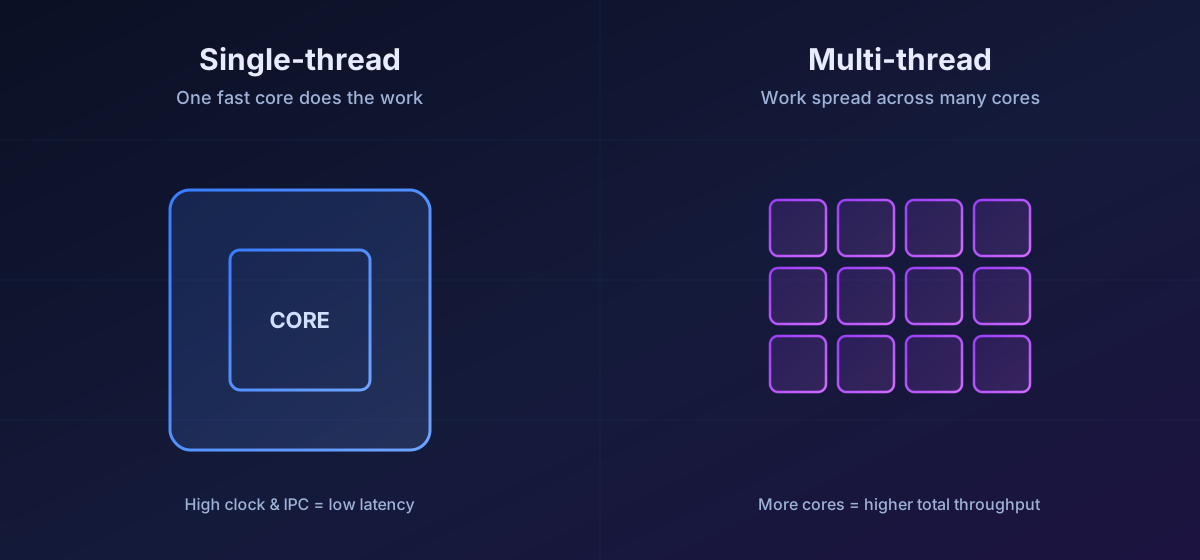
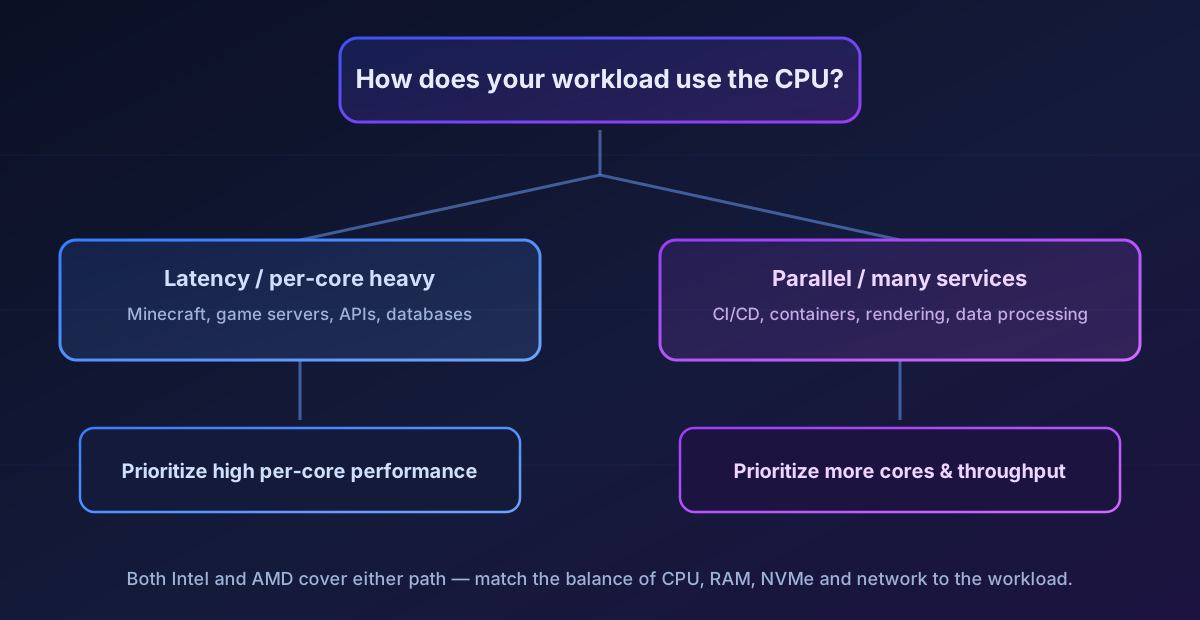
Modern server workloads generally fall somewhere between two extremes.
On one end are applications that depend heavily on the performance of one or a few CPU cores. These workloads care more about latency and per-core performance than they do about the total number of available cores.
On the other end are applications that can spread work efficiently across many threads. These benefit from higher overall processing capacity and can take advantage of every available core.
Most real-world workloads sit somewhere in the middle.
That’s why choosing a dedicated server should always start with the application—not the processor.
Game servers
Game servers are one of the most popular reasons for renting dedicated hardware.
They’re also one of the easiest workloads to misunderstand.
A common recommendation you’ll find online is:
“Buy the CPU with the highest clock speed.”
Another common recommendation is:
“Buy the processor with the most cores.”
Neither statement is universally true.
Every game engine uses hardware differently.
Understanding those differences is far more useful than following generic advice.
Minecraft
Minecraft remains one of the best examples of a workload that benefits from excellent per-core performance.
Modern server software such as Paper, Purpur and Folia has become much better at distributing certain tasks across multiple threads, including chunk generation, networking and disk operations.
However, the main server loop still relies heavily on strong single-thread performance.
For servers with many players, large worlds and numerous plugins, faster individual cores often translate into more stable TPS (Ticks Per Second) and smoother gameplay.
That doesn’t mean additional cores are wasted.
If you’re running multiple Minecraft instances, proxies, databases, monitoring tools or other supporting services on the same machine, overall processing capacity becomes increasingly important.
Like most workloads, Minecraft benefits from balance rather than chasing a single specification.
FiveM
FiveM behaves differently.
Besides the main server process, communities often run custom resources, Lua scripts, databases, voice services and various background tasks.
Many of these components can make use of multiple CPU cores.
As servers grow larger and more complex, overall processing capacity becomes increasingly important alongside per-core performance.
Rather than looking for the “best CPU,” it’s better to choose hardware that matches the complexity of your server and the size of your community.
Other game servers
Counter-Strike 2, Rust, ARK: Survival Ascended, Valheim, Terraria, Project Zomboid and many other games all behave differently.
Some scale extremely well across multiple cores.
Others remain limited by one primary execution thread.
That’s why we always recommend choosing hardware based on the specific game you’re hosting rather than relying on generic “Intel vs AMD” advice.
Web hosting
Modern web hosting is far more demanding than simply serving HTML pages.
A typical production server may simultaneously run:
- Nginx or Apache
- PHP-FPM
- MariaDB or PostgreSQL
- Redis
- scheduled tasks
- monitoring services
- backup jobs
- applications written in Node.js, Python, Go or .NET
Each service places different demands on the system.
Some requests depend primarily on fast single-thread execution.
Others naturally distribute work across multiple CPU cores as traffic increases.
Storage performance also plays a major role.
Fast NVMe drives reduce database latency, while sufficient memory allows frequently accessed data to remain cached, reducing response times even further.
This is why evaluating a hosting server based solely on CPU specifications rarely tells the whole story.
Balanced hardware almost always delivers better long-term performance than simply choosing the processor with the highest benchmark score.
Business applications
Dedicated servers are increasingly used to power internal business platforms, SaaS applications, APIs, ERP systems and custom software.
Unlike desktop applications, these environments usually consist of multiple services working together.
A single server might simultaneously run:
- application servers
- databases
- authentication services
- background workers
- monitoring systems
- scheduled maintenance tasks
Some operations benefit greatly from strong per-core performance.
Others scale efficiently across many threads.
The ideal server therefore depends on the architecture of the application itself.
Before choosing hardware, it’s worth asking a few practical questions:
- How many users will access the platform?
- Are there predictable traffic peaks?
- Will multiple applications share the same server?
- How quickly is the project expected to grow?
Answering these questions usually leads to a much better hardware decision than comparing processor specifications alone.
Parallel workloads
Some workloads naturally benefit from having as much processing capacity as possible.
Examples include:
- software compilation
- CI/CD pipelines
- data processing
- automation
- rendering
- large-scale file processing
- containerized environments
- multiple independent services running simultaneously
In these scenarios, applications can efficiently distribute work across many CPU cores.
Overall throughput becomes more important than maximizing the speed of a single thread.
Once again, this isn’t about Intel versus AMD.
It’s about choosing hardware that matches how your software actually works.
So… where do Intel and AMD fit?
After everything we’ve covered, we’re finally back to the original question.
Intel or AMD?
The truth is that both companies now build outstanding processors for dedicated servers.
Modern Intel and AMD platforms are capable of handling virtually every common server workload.
The performance gap between them has become much smaller than it was years ago.
Instead of one manufacturer consistently outperforming the other, different processor families simply excel under different conditions.
That’s why we don’t recommend servers based on brand alone.
We recommend them based on workload.
Once you understand how your application uses CPU resources, choosing between Intel and AMD becomes much easier—and far more accurate than relying on benchmark charts alone.
Intel vs AMD at a glance
Neither platform is a universally better dedicated server CPU—their strengths simply land in different places. This overview compares them the way it actually matters for a production server, not by benchmark points.


| Feature | Intel | AMD |
|---|---|---|
| Single-core workloads | ⭐⭐⭐⭐⭐ | ⭐⭐⭐⭐☆ |
| Multi-thread workloads | ⭐⭐⭐⭐☆ | ⭐⭐⭐⭐⭐ |
| Game server hosting | Excellent | Excellent |
| Web hosting server | Excellent | Excellent |
| CI/CD & parallel builds | Excellent | Excellent |
| Price / performance | Depends on the plan | Depends on the plan |
Both make excellent bare metal servers. The right pick comes down to whether your workload leans on strong single-core performance or higher overall throughput—not the brand on the heatspreader.
How to choose the right dedicated server
Once you understand how your workload uses CPU resources, choosing a dedicated server becomes much more straightforward.
Instead of comparing processor brands, focus on the resources your project actually needs.
The processor is only one component of a much larger system.
Memory, NVMe storage, networking and the software itself all play a role in determining overall server performance.
When helping customers choose a dedicated server, we typically start with a few simple questions.
- What application are you planning to run?
- How many users or players do you expect?
- Will the server host a single service or multiple applications?
- Do you expect your project to grow over time?
- Is low latency more important than maximum processing capacity?
The answers to these questions tell us far more than simply asking whether someone prefers Intel or AMD.
They also help avoid two common mistakes:
- Choosing hardware that quickly becomes a bottleneck.
- Paying for resources that the project will never actually use.
The goal isn’t to buy the biggest server available.
The goal is to choose the right server for the workload.
Dedicated server configurations
Lusonode offers dedicated servers based on both Intel and AMD platforms, allowing you to choose the configuration that best matches your requirements.
Rather than treating one platform as universally better than the other, we see them as different tools designed for different types of workloads.
Some projects benefit from outstanding single-core performance.
Others benefit from higher overall processing capacity.
Many projects require a balance between both.
That’s why we always recommend evaluating the workload first and the processor second.
A quick decision guide
If you’re still unsure where to start, this table provides a good general guideline.
| If you’re running… | Prioritize… |
|---|---|
| Minecraft servers | Strong per-core performance |
| FiveM servers | A balance between single-core and multi-thread performance |
| Web hosting platforms | Balanced CPU performance, memory and NVMe storage |
| Latency-sensitive APIs | Fast per-core performance |
| Business applications | Balanced overall system performance |
| CI/CD pipelines | High multi-thread processing capacity |
| Software compilation | Parallel processing performance |
| Data processing | More processing capacity and sufficient memory |
| Multiple independent services | A balanced configuration with room to grow |
Notice that the recommendations aren’t simply “choose Intel” or “choose AMD.”
That’s intentional.
The workload matters far more than the logo printed on the processor.
Common myths about dedicated server CPUs
A few beliefs come up again and again when people choose a dedicated server. Most of them are outdated.
“More GHz always means a faster server.” Not necessarily. Modern processors differ significantly in IPC, cache design and architecture, so two CPUs running at the same frequency can deliver very different server performance.
“More cores always improve performance.” Only if the software knows how to use them. Many applications still rely heavily on one or a few execution threads, leaving extra cores idle.
“Intel is for gaming, AMD is for servers.” This hasn’t been true for years. Both manufacturers build processors capable of powering modern game server hosting, web hosting platforms and demanding enterprise workloads.
“Benchmarks tell the whole story.” Benchmarks are useful, but they rarely reflect how a production dedicated server behaves under real, mixed workloads.
What every Lusonode dedicated server includes
While processor configurations vary, the underlying infrastructure remains consistent across our dedicated server lineup.
Every dedicated server includes:
- High-performance NVMe storage
- A 1 Gbps symmetrical network connection
- Unlimited traffic
- Always-on LNSHIELD DDoS protection
- Fully dedicated hardware
- Full administrative access
- Choice of operating system
- Enterprise-grade infrastructure hosted in professional German data centers
This means your decision can focus entirely on choosing the right amount of compute power, memory and storage for your workload.
You don’t need to compare different networking tiers or storage technologies across plans—they’re already part of the platform.
How we recommend dedicated servers
When someone contacts us looking for a dedicated server, the first question is almost never:
“Do you want Intel or AMD?”
Instead, we try to understand the project itself.
Questions like these are much more useful:
- What software will you be running?
- How many users do you expect?
- Is this a new deployment or an existing production environment?
- Are there any specific memory or storage requirements?
- Do you expect significant growth over the next year?
Only after understanding the workload do we recommend a server configuration.
This approach helps avoid both underpowered deployments and unnecessary overspending.
The goal isn’t to sell the most expensive server.
It’s to recommend the server that best fits your project today while leaving enough room for future growth.
Intel or AMD? The answer is still the same.
If you’ve read this far, you’ve probably realized that the original question doesn’t have a simple answer.
Today’s Intel and AMD processors both offer outstanding performance for dedicated hosting, making workload characteristics far more important than processor branding.
Intel continues to offer outstanding options for workloads that benefit from strong per-core performance.
AMD continues to provide highly competitive platforms capable of handling demanding multi-threaded workloads.
For most businesses, however, the deciding factor won’t be the processor brand.
It will be the workload.
Choosing hardware based solely on clock speed, core count or benchmark rankings often leads to decisions that look good on paper but provide little real-world benefit.
Understanding your application’s behavior almost always results in a better server, better long-term performance and a more efficient investment.
That’s why we believe the best question isn’t:
“Should I choose Intel or AMD?”
It’s:
“Which server best matches the way my application works?”
Answer that question first, and everything else becomes much easier.
Modern dedicated servers are no longer defined by the logo on the processor. They’re defined by how well their hardware matches the workload they’re expected to run. Whether you choose an Intel dedicated server or an AMD dedicated server, the best bare metal server is the one that provides the right balance of CPU performance, memory, NVMe storage and networking for your application.
If you’re unsure which configuration fits your project, our team can help you choose the right dedicated server based on your workload rather than marketing claims.
Frequently Asked Questions
Is Intel better than AMD for dedicated servers?
Neither platform is universally better.
Both Intel and AMD offer excellent processors capable of powering modern dedicated servers.
The right choice depends on your workload, your performance requirements and the overall server configuration.
Does a higher clock speed always mean better performance?
No.
Clock speed is only one part of CPU performance.
Processor architecture, IPC, cache design and how efficiently your application uses CPU resources all have a significant impact on real-world performance.
Are more CPU cores always better?
Not necessarily.
Some applications scale extremely well across many cores.
Others rely primarily on one or two threads.
Choosing the right processor depends on how your software distributes work.
Does NVMe storage really make a difference?
Yes.
Compared to traditional SATA SSDs, NVMe drives offer much lower latency and significantly higher throughput.
For databases, websites, APIs, game servers and many other workloads, the difference is immediately noticeable.
I’m still not sure which server I need.
That’s perfectly normal.
Every project has different requirements.
If you’re unsure which configuration is right for your workload, get in touch with our team and tell us what you’re planning to run.
We’ll recommend a dedicated server based on your actual requirements—not simply on processor branding.